Error and System Health Monitoring
Every server error is stored with a correlation code the owner can search in a dashboard, next to backup status and service quotas.
- Status
- Live
- Layers
- DevOpsBackend
- Used by
- Numekara's owner and tech team, who need to find the cause of a user complaint quickly.
The problem
When a user reports 'I can't pay', a small team struggles to find the matching error among thousands of log lines.
The solution
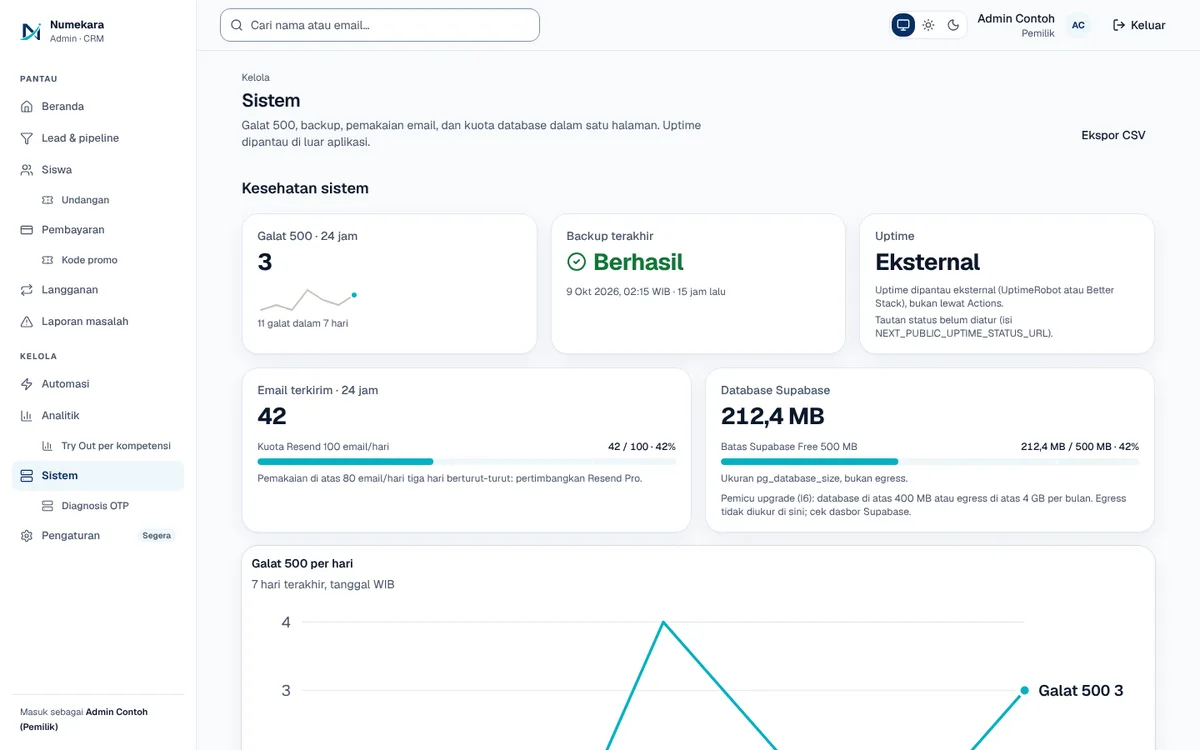
Each request carries a correlation code that also appears in error messages and issue reports. 500 errors are kept for 30 days with secrets scrubbed, and an admin page shows errors, backup status, and service quotas.
How it works
What happens, step by step, from the user's point of view.
- 01
Every request gets a code
Each time a page asks the server for data, the request gets a correlation code. The same code appears in all of its technical notes.
- 02
Errors are recorded automatically
When the server fails to handle a request (a 500 error), the details are saved to the database with its code.
- 03
Sensitive data is scrubbed
Email addresses and database values are removed before saving. Error records clear themselves out after 30 days.
- 04
The user shares the error code
The error message the user sees, and any problem report, carry the same code. Sending the code or a screenshot is enough.
- 05
The owner searches the dashboard
On the System page, the owner pastes the code and sees the matching error. The list can be exported to CSV.
- 06
System health on one screen
The same page shows backup status, email usage, and database quota. During a release, health checks confirm the new server is ready.
System design
Who uses it, what they see, what works behind the scenes, and where the data lives. Read it from left to right.
1People
- UserSees an error message with a code when something fails
- OwnerLooks up the error using the code the user sent
2What they see
- Error messageShows a correlation code the user can copy
- System page30 days of errors, backup status, quotas, and CSV export
3Behind the scenes
- API serverFastAPI tags each request with a code and catches 500 errors
- Health checkFly.io only sends visitors over once the new server reports healthy
4Where data lives
- Error recordsPostgreSQL keeps scrubbed errors for 30 days
- Server logsTechnical notes where every line carries the correlation code
Key features
- Correlation code on every request
- Errors kept for 30 days
- Secrets scrubbed automatically
- Health checks for deploys
- CSV export of errors
Built with
- FastAPI
- PostgreSQL
- structlog
- Next.js
- Fly.io
What the business gets
- User complaints can be matched straight to the real error.
- The owner can check system health without logging in to the server.
- Users' personal data isn't kept in the error records.
- A new version doesn't receive visitors until it passes the health check.
Terms on this page
- Galat 500 (500 error)
- A sign the server failed to handle a request because of a problem in the app, not the user's mistake.
- Kode korelasi (correlation ID)
- A unique number for one request, like a tracking number, so its trail can be followed end to end.
- Health check
- An automatic check that asks the server "are you ready?" before visitors are sent to it.
- CSV
- A simple table format that opens in Excel or Google Sheets.
Can it work for your business?
Makes your app easier to maintain: user complaints can be matched straight to the real error.
Ask about this project