Bug Reports with Screenshots
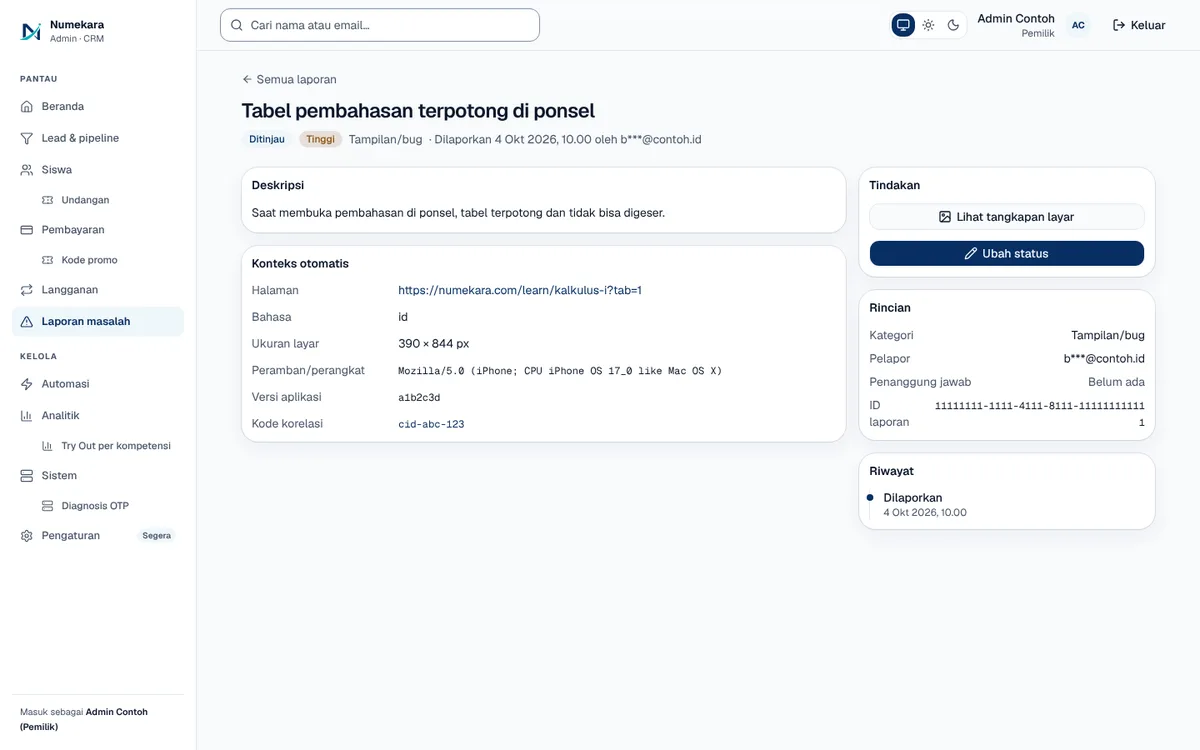
A 'Report a problem' button on every page that sends a description, a screenshot, and technical context to the admin queue.
- Status
- Live
- Layers
- FrontendBackend
- Used by
- Site users who run into a problem, and the admins who follow up on their reports.
The problem
User bug reports usually arrive in chat without details, so they're hard to reproduce and fix.
The solution
The report form attaches the page, device, app version, and the last error's correlation code. Screenshots upload straight to private storage, and admins manage status and priority in one dashboard.
How it works
What happens, step by step, from the user's point of view.
- 01
User taps 'Report a problem'
The button sits on every page. The user picks a category and describes what happened.
- 02
A screenshot can be attached
If useful, the user adds a screenshot. It goes straight to private storage, not through chat.
- 03
Technical details fill themselves in
The page, device, screen size, app version, and last error code are sent along. The user doesn't have to explain any of it.
- 04
Spam gets filtered out
The server limits how often reports can be sent, sets a bot trap, and uses Cloudflare Turnstile. Reports that pass are saved to the database.
- 05
Admins are alerted and triage
Admins get a Telegram or email alert, then set the report's status and priority in the dashboard.
- 06
The reporter hears back
When a report is marked resolved or won't fix, the reporter gets an email. Signed-in users can also check their report's status.
System design
Who uses it, what they see, what works behind the scenes, and where the data lives. Read it from left to right.
1People
- Site userReports a problem from any page
- AdminSorts, prioritises, and closes reports
2What they see
- Report formOpens from a button on every page; technical details fill in automatically
- My reportsSigned-in users see the status of their own reports
- Reports dashboardThe report queue with status, priority, and screenshots
3Behind the scenes
- API serverFastAPI checks for spam, saves the report, and sends alerts
- Cloudflare TurnstileChecks that the sender is a person, not a bot
4Data and outside services
- DatabasePostgreSQL stores each report, its status, and its priority
- Image storageSupabase Storage keeps screenshots in a private bucket
- Telegram and emailAlert admins about new reports and reporters when one is closed
Key features
- Report button on every page
- Direct screenshot upload
- Technical context filled in
- Spam protection with Turnstile
- Status and priority tracking
Built with
- Next.js
- FastAPI
- PostgreSQL
- Supabase Storage
- Cloudflare Turnstile
What the business gets
- Problem reports arrive complete, not just "the site is broken".
- Each report can be matched to the server error through its correlation code.
- No complaint gets lost in chat; everything lands in one queue.
- Reporters know their report was followed through.
Terms on this page
- Kode korelasi (correlation ID)
- A unique number attached to each request to the server, so a report and its matching error can be found together.
- Cloudflare Turnstile
- A quick Cloudflare check that tells people from bots without annoying picture puzzles.
- API
- The server's service door that takes data from the web page and applies the business rules.
- Database
- A digital filing cabinet where every report is stored neatly and can be searched.
Can it work for your business?
Can be added to your app or website so user complaints arrive complete instead of getting lost in chat.
Ask about this project