Business Dashboards for Owners
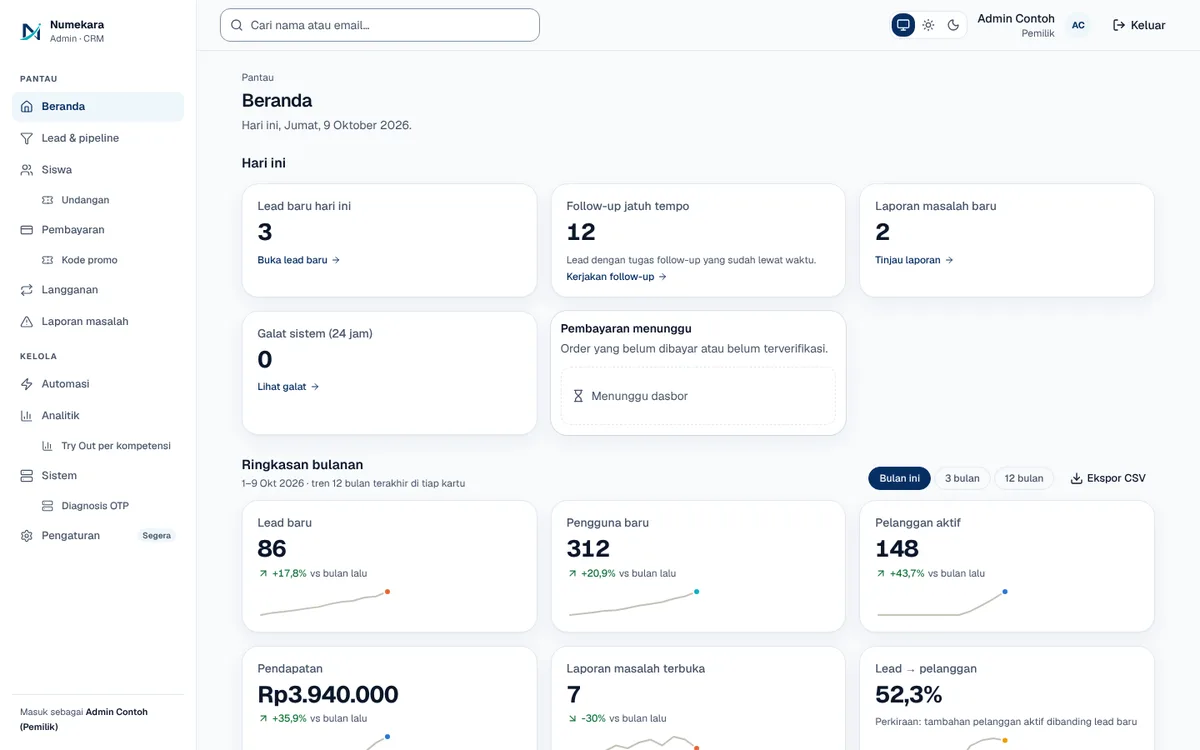
Seven dashboards covering leads, users and subscriptions, revenue, product usage, issue reports, and system health.
- Status
- Live
- Layers
- DataFrontendBackend
- Used by
- Business owners who want leads, revenue, subscriptions, and product usage in one place.
The problem
Small business owners often decide without numbers because sales, lead, and subscription data sit in different apps.
The solution
Website, payment, and subscription data is summarised daily into readable charts and figures with written metric definitions. When data is missing, the dashboard says so instead of showing a fake zero.
How it works
What happens, step by step, from the user's point of view.
- 01
Daily activity is recorded
Leads, payments, subscriptions, feature usage, and issue reports are saved to the database as they happen.
- 02
Summaries built on schedule
A scheduled job saves a daily subscription snapshot and monthly figures, so the dashboards don't recount everything.
- 03
The owner opens a dashboard
There are dashboards for overview, leads, subscriptions, revenue, usage, issue reports, and system health.
- 04
Compare with the previous period
The owner picks a date range, and each figure is compared with the previous period of the same length.
- 05
Missing data is labelled
If a data source isn't available yet, the dashboard says so instead of showing zero. Every metric has a written definition.
- 06
Download as CSV
Dashboard data can be downloaded for further work in a spreadsheet.
System design
Who uses it, what they see, what works behind the scenes, and where the data lives. Read it from left to right.
1People
- Business ownerReads figures and charts to make decisions.
2What they see
- Admin dashboardsSeven dashboards with line, bar, and funnel charts plus cohort tables.
- Lightweight chartsDrawn directly as SVG, without an extra charting library.
3Behind the scenes
- Metric calculatorFastAPI computes figures and period comparisons inside the database.
- Scheduled jobSaves daily snapshots and monthly figures at regular intervals.
4Where data lives
- DatabasePostgreSQL stores leads, orders, subscriptions, and monthly summaries.
Key features
- Lead-to-enrolment funnel
- Revenue and subscription MRR
- Customer cohort retention
- Lightweight charts, no library
- CSV data export
Built with
- Next.js
- FastAPI
- PostgreSQL
- SVG
What the business gets
- Business decisions rest on figures, not guesses.
- Leads, revenue, and subscriptions are visible in one place.
- Figures that aren't available yet aren't disguised as zero.
- Every metric's meaning is written down, so the whole team reads the numbers the same way.
Terms on this page
- Dashboard
- A summary page of key business figures and charts, like the instrument panel in a car.
- MRR
- Monthly recurring revenue: the subscription income expected to come in each month.
- Kohort
- A group of customers who started in the same month, tracked to see how long they stay.
- CSV
- A simple table file format that opens in Excel or Google Sheets.
Can it work for your business?
Can become a sales or operations dashboard for your business, with metrics agreed together from the start.
Ask about this project