Interactive Lesson Engine
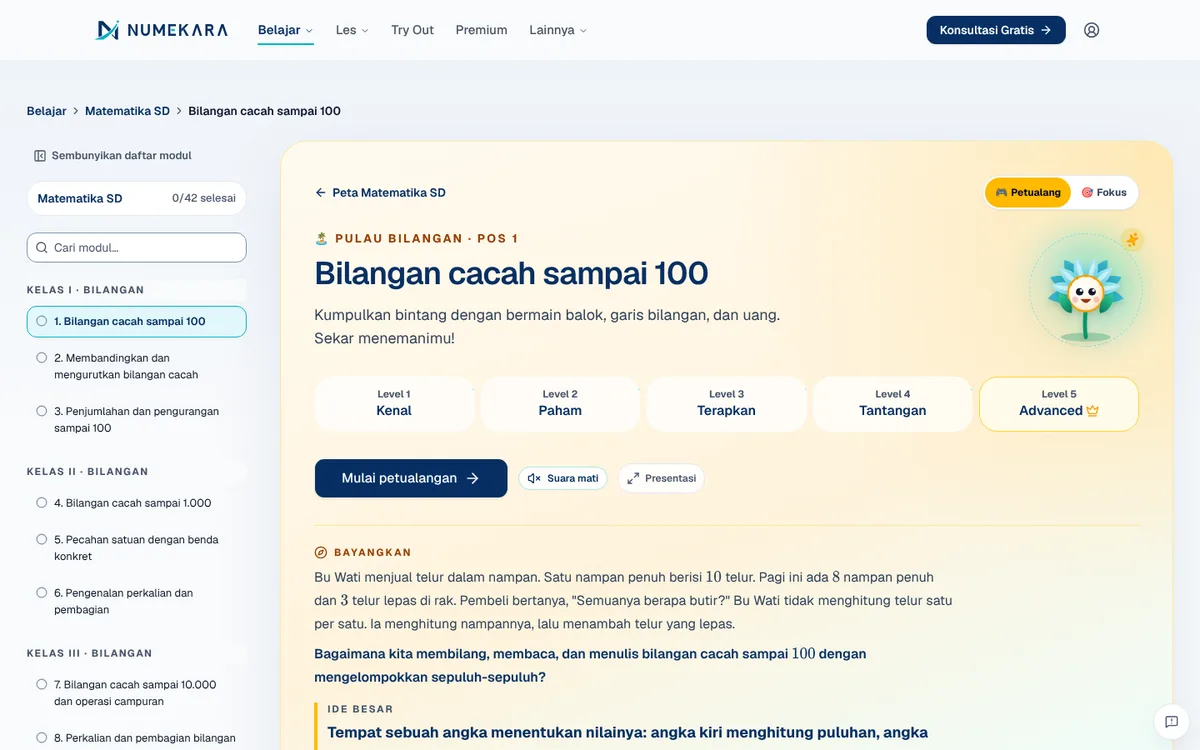
An interactive maths lesson platform: one idea per screen, hands-on visual tools, and automatic checking at every step.
- Status
- Live
- Layers
- FrontendData
- Used by
- Students from primary school to university learning maths on their own phone or laptop, and the content team that writes the modules.
The problem
PDF handouts and long videos keep students passive, and it's hard to check understanding before they move on.
The solution
Each module is split into short screens with interactive visual tools, auto-graded questions, animations, and a lab. Automated quality checks block any module that misses the standard before it goes live.
How it works
What happens, step by step, from the user's point of view.
- 01
Student picks a course and module
The student opens the learning page, chooses a course such as Junior High Maths, and enters a module. There is an Adventure mode with an island map and a simpler Focus mode.
- 02
One screen, one idea
The material is split into short screens. Each screen explains one thing, often with a short animated clip.
- 03
Student works the visual tools
The student slides along a number line, stacks tens blocks, or folds a cube net right on the screen.
- 04
Answers are checked instantly
The browser checks the answer or the tool's position on the spot. A wrong answer brings step-by-step hints and an explanation of the common mistake.
- 05
Module results are saved
The student earns stars and XP at the end of the module. Progress is kept on the device, and also saved to the account once the student signs in.
System design
Who uses it, what they see, what works behind the scenes, and where the data lives. Read it from left to right.
1People
- StudentLearns on a phone or laptop, with or without an account.
- Content teamWrites modules as data files instead of building pages one by one.
2What they see
- Course mapThe list of modules in Adventure or Focus mode.
- Lesson playerShows the screens, visual tools, questions, and animated clips.
3Behind the scenes
- Auto-graderChecks answers and tool positions right in the browser.
- Quality checksBlocks modules with wrong keys or gaps in the question ladder before release.
4Where data lives
- Module files543 modules stored as JSON files, some also in English.
- Account progressSigned-in students' progress is stored in a PostgreSQL database.
Key features
- Interactive visual tools in-browser
- Auto-graded questions
- Adventure and focus modes
- Quality gates before publishing
- English version for 9 courses
Built with
- Next.js
- React
- TypeScript
- Zod
- KaTeX
- Vitest
Numbers you can check
- 543
- Interactive lesson modules
- 18
- Maths courses
What the business gets
- Students try things themselves instead of only reading or watching.
- Mistakes are explained right on the same screen.
- Modules that miss the standard are held back before students see them.
- Adding a module means writing a new file, not building a page from scratch.
Terms on this page
- Browser
- The app you open websites with, such as Chrome; grading runs here, so results appear immediately.
- JSON
- A tidy text format for storing data; here each lesson module is one JSON file.
- Database
- A central place where the system keeps its data, like a digital ledger.
Can it work for your business?
Works for staff training, product onboarding, or your online course: material becomes interactive and every step is checked on the spot.
Ask about this project