Automated Animation Video Pipeline
Lesson animation clips are generated from code, re-rendered only when they change, subtitled, and uploaded to video storage automatically.
- Status
- Live
- Layers
- AutomationDevOps
- Used by
- The content team that makes lesson explainer clips, and the students who watch them inside each module.
The problem
Making and updating hundreds of explainer videos by hand is expensive, and the numbers on screen easily drift from the lesson.
The solution
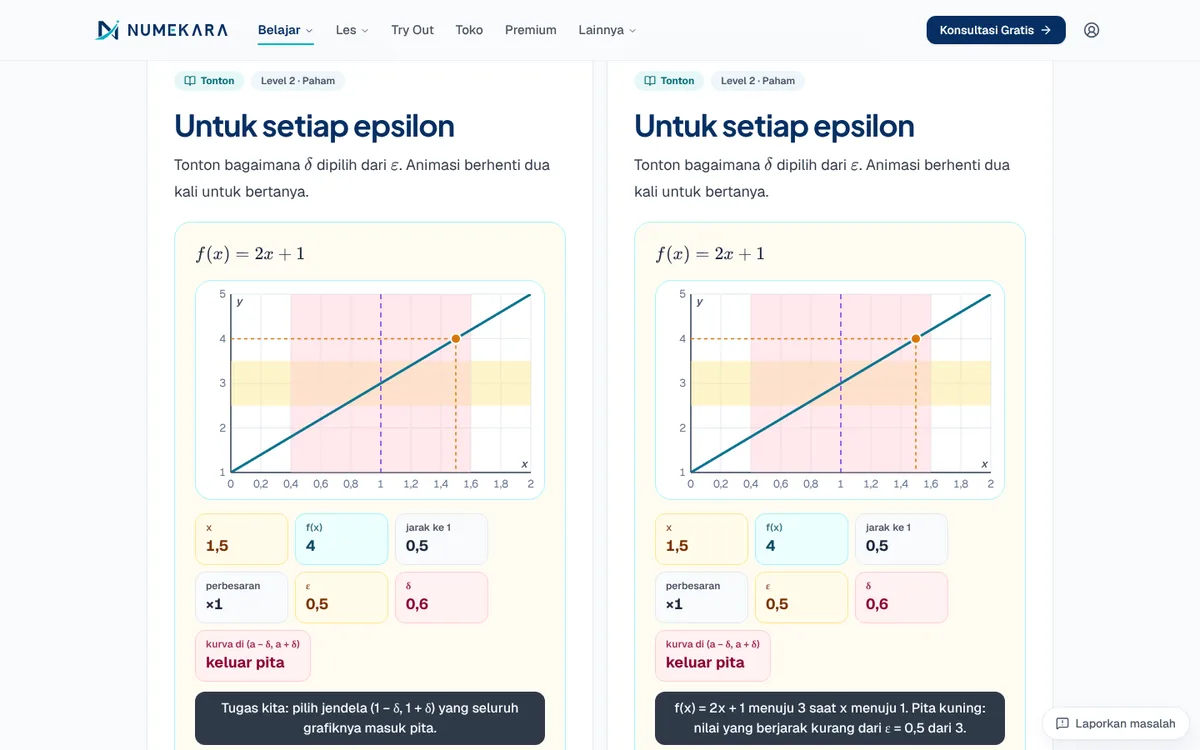
The storyboard in each lesson drives both the Manim animation and the subtitles, so on-screen numbers match the lesson. A scheduled workflow renders only the affected clips and uploads them to Cloudflare R2.
How it works
What happens, step by step, from the user's point of view.
- 01
Storyboard written in the lesson
The writer sets out the scene order, timing, and narration text right in the lesson file.
- 02
Animation scenes written in code
Each clip has one Python Manim file that reads that storyboard. If an animation overruns its time slot, the render fails.
- 03
Only changed clips
Once a week, the system picks only the clips affected by changes and splits the work across several machines.
- 04
Render video and subtitles
GitHub Actions renders MP4 and WebM video plus a poster image. Subtitles come from the same storyboard, so text and picture always match.
- 05
Upload to Cloudflare R2
Finished clips are uploaded automatically to Cloudflare R2 storage, where the website fetches them.
- 06
Students watch with pauses
In the module, the video pauses to ask a question. If a clip isn't available yet, a stand-in demonstration plays in the browser.
System design
Who uses it, what they see, what works behind the scenes, and where the data lives. Read it from left to right.
1People
- Content teamWrites the storyboards and animation scenes.
- StudentWatches the clips inside lesson modules.
2Sources
- Lesson filesStoryboards with the steps, timing, and text of each scene.
- Manim scenes564 Python scenes that draw the animations.
3Automation
- Clip plannerPicks the changed clips and splits the work across machines.
- GitHub ActionsRenders early every Monday, or manually when urgent.
4Storage and playback
- Cloudflare R2Stores videos, posters, and subtitles for the website to play.
- Clip playerPlays the video with question pauses, or a stand-in demo.
Key features
- Animation from lesson storyboards
- Renders only changed clips
- Automatic subtitles
- Automatic upload to R2
- In-browser fallback demo
Built with
- Python
- Manim
- FFmpeg
- GitHub Actions
- Cloudflare R2
Numbers you can check
- 564
- Manim animation scenes
What the business gets
- Updating a lesson doesn't mean re-editing videos by hand.
- Numbers in the video always match the numbers in the lesson.
- Render time is saved because only changed clips are re-rendered.
- Students still get a visual explanation even before a video is uploaded.
Terms on this page
- Manim
- A Python library for making maths animation videos with code.
- Render
- The process of a computer turning animation code into a video file.
- Storyboard
- A plan of the scenes with their timing and text, like a script for the video.
- Cloudflare R2
- An online file storage service where the videos are kept and fetched by the website.
Can it work for your business?
Works for product videos, tutorials, or training material that changes often, without re-editing every video by hand.
Ask about this project