Vehicle Detection with YOLO11
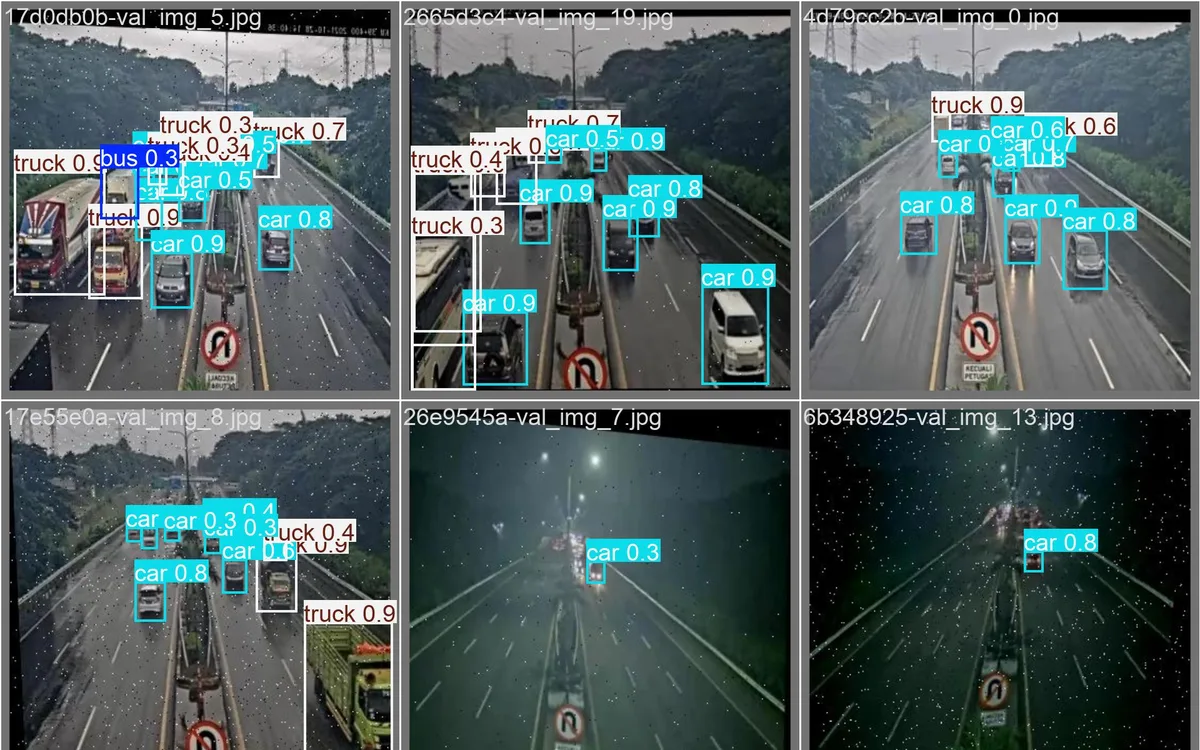
A YOLO11n object-detection model fine-tuned to spot buses, cars, and trucks in traffic photos.
- Status
- Prototype
- Layers
- AI
- Used by
- A computer-vision practice project showing how an AI learns to recognise vehicles in photos; not yet used in the field.
The problem
Spotting or counting vehicles in photos and footage by hand is slow and tiring.
The solution
YOLO11n was fine-tuned for 50 epochs on a labelled three-class dataset, then validated and used to predict new images at a 0.5 confidence threshold.
How it works
What happens, step by step, from the user's point of view.
- 01
Traffic photos are gathered
A set of photos with buses, cars, and trucks is prepared, then split into training and test photos.
- 02
Each vehicle is labelled
In each photo, vehicles are marked with a box and their type. These labels are what the model learns from.
- 03
A ready-made model is retrained
YOLO11n, which already knows everyday objects, is retrained for 50 epochs on these photos, on a regular CPU.
- 04
Tested on unseen photos
The model is tested on photos it didn't train on. Overall mAP50 is 0.603 on 20 test images.
- 05
Weak spots show per class
The confusion matrix shows buses are still weak because there are few examples. It points to the data that needs adding.
- 06
The model marks vehicles in photos
A new photo goes in, and the model draws a box and name on each vehicle it recognises with at least 0.5 confidence.
System design
Who uses it, what they see, what works behind the scenes, and where the data lives. Read it from left to right.
1Input
- Labelled photosTraffic photos with boxes marking buses, cars, and trucks
2Training
- Jupyter notebookWhere every training, testing, and prediction step is run
- Ultralytics YOLO11nAn object-detection model retrained for three vehicle types
3Testing
- ValidationMeasures accuracy on photos the model hasn't seen
- Charts and matrixPrecision and recall curves plus a per-class confusion matrix
4Output
- Annotated photosImages with a box and name on each detected vehicle
- Best model weightsA model file that can be reused on new photos
Key features
- Detects buses, cars, and trucks
- Fine-tuned from a pretrained model
- Precision and recall curves
- Per-class confusion matrix
- Trained on CPU
Built with
- Python
- Ultralytics YOLO11
- PyTorch
- OpenCV
- Matplotlib
- Jupyter
Numbers you can check
- 0.603
- Validation mAP50 (20 images)
What the business gets
- Shows that a ready-made model can be taught specific vehicle types with your own data.
- The model's weak spots show up per class, so it's clear what data to add.
- Training can run on an ordinary computer without a dedicated graphics card.
- Could grow into counting cars in a car park or checking goods from photos and CCTV.
Terms on this page
- Object detection
- An AI's ability to find objects in an image, box them, and name what they are.
- Epoch
- One round in which the model looks at every training photo once.
- mAP50
- A 0-to-1 score for how accurately the model finds and boxes objects; higher is better.
- Confusion matrix
- A table showing how often the model mixes up types, such as mistaking a truck for a bus.
Can it work for your business?
Can grow into counting cars in a car park, spotting products on shelves, or checking warehouse stock from photos or CCTV.
Ask about this project