Lead CRM and Follow-Up Pipeline
An admin dashboard that captures every website lead, moves it through statuses until enrolment, and manages follow-up tasks.
- Status
- Live
- Layers
- BackendFrontendData
- Used by
- Admins and owners who follow up prospective students from the website until they enrol.
The problem
Leads from forms, chats, and consultations end up scattered, so it's hard to know who has been contacted and who slipped through.
The solution
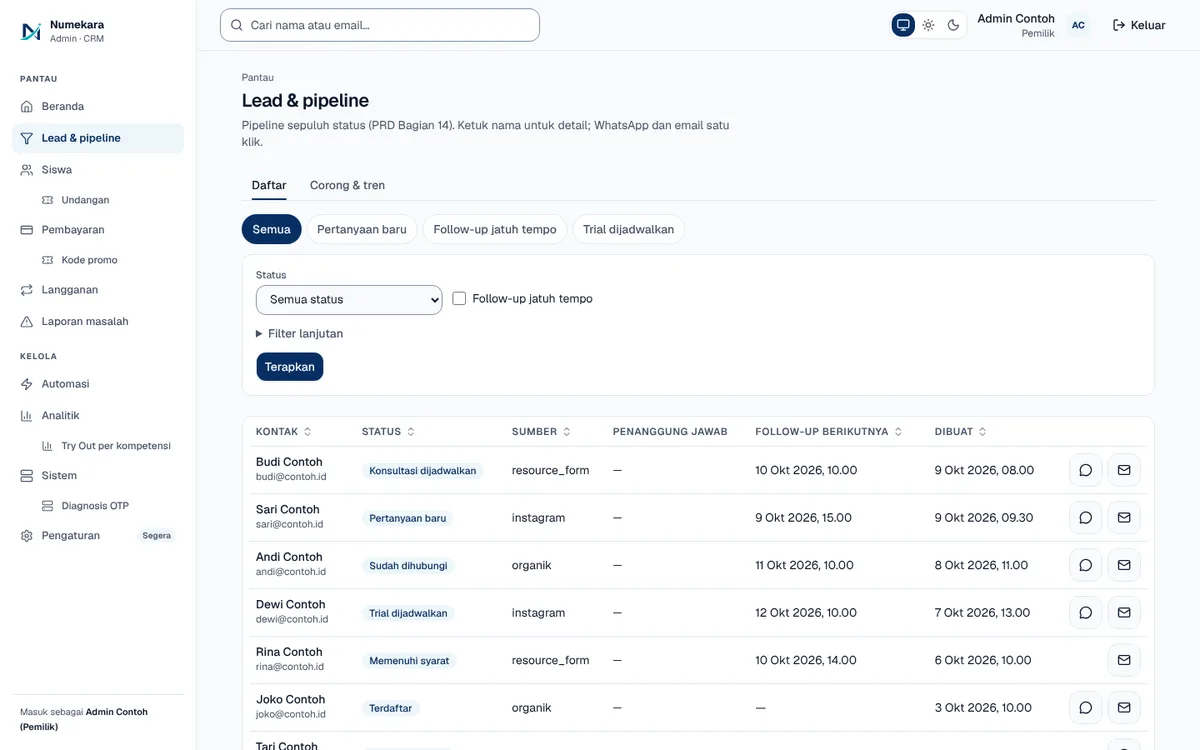
Every lead lands in one list with 10 pipeline stages, an owner, an activity log, and follow-up tasks. From the same page, admins can raise an invoice, record a payment, and run the onboarding checklist.
How it works
What happens, step by step, from the user's point of view.
- 01
Leads arrive automatically
Every consultation, sign-up, or diagnostic test submitted on the website becomes a lead in the list.
- 02
Assign an owner
The admin assigns who handles the lead, so nobody waits on someone else.
- 03
Move it through stages
There are 10 stages, from new enquiry, contacted, consultation, and trial lesson to enrolled or lost. Every move is kept in the history.
- 04
Schedule follow-up tasks
The admin logs activity and creates tasks with due dates. The system sends a reminder when a task is due.
- 05
Invoice and onboarding
From the same lead page, the admin raises an invoice, records the payment, and runs the new-student checklist.
- 06
View the funnel and export
The funnel tab shows how many leads sit at each stage, and the data can be downloaded as CSV.
System design
Who uses it, what they see, what works behind the scenes, and where the data lives. Read it from left to right.
1Where leads come from
- Website formsConsultation, lesson sign-up, and free diagnostic test forms.
2What the admin sees
- Lead listFilter by status, owner, source, or programme interest.
- Lead detailStatus history, notes, tasks, invoices, and the onboarding checklist.
3Behind the scenes
- CRM serverFastAPI saves each change and checks every admin's permissions.
4Where data lives
- DatabasePostgreSQL stores leads; status history can't be edited afterwards.
Key features
- 10-stage lead pipeline
- Follow-up tasks and activity log
- Invoices and payment recording
- New-student onboarding checklist
- CSV export
Built with
- Next.js
- FastAPI
- PostgreSQL
- SQLAlchemy
What the business gets
- Every lead sits in one place instead of being scattered across chats and notes.
- It's clear who has been contacted and who slipped through.
- Each lead has an owner and follow-up tasks.
- Leads move to enrolled automatically once their payment clears.
Terms on this page
- CRM
- A digital record of every prospective customer, with their status and follow-up history.
- Pipeline / corong
- The series of stages a prospect passes through, from first enquiry to purchase.
- CSV
- A simple table file format that opens in Excel or Google Sheets.
Can it work for your business?
Adaptable for agencies, clinics, property, or B2B services. Rename the pipeline stages and data fields to match your sales process.
Ask about this project